
Progressive Web App (PWA) Development: App-Like Experiences Without the App Store
Give your customers a fast, installable app that works on any device, even on slow connections, without paying to build and maintain separate iOS and Android apps. Esclatech builds progressive web apps that load fast, work offline and keep users coming back.

Clutch · GoodFirms · Trustpilot 4.1/5 (81 reviews) · Houston, TX

GoodFirms · Top Software Companies in Houston, 2026

The Manifest · Top Software Companies in Texas, 2026

TechReviewer · Top Web Development Companies in Houston

Clutch · Top Full-Service Software Companies, 2026

Trustpilot · Rated 4.1/5 from 81 Reviews
G2 · Top Rated Software & IT Solutions Provider

Medium · Client Review: Mobile App Project

RealReviews · Verified Customer Feedback & Ratings
GoodFirms · Top Software Companies in Houston, 2026
The Manifest · Top Software Companies in Texas, 2026
TechReviewer · Top Web Development Companies in Houston
Clutch · Top Full-Service Software Companies, 2026
Trustpilot · Rated 4.1/5 from 81 Reviews
G2 · Top Rated Software & IT Solutions Provider
Medium · Client Review: Mobile App Project
RealReviews · Verified Customer Feedback & Ratings
Want a Mobile App, But Not the
Cost and Complexity of Two?
Many businesses need an app experience on phones, without doubling their engineering budget or forcing customers through an app store download.
Double the cost & release work
Building and maintaining separate iOS and Android apps doubles your cost and your release work.
Slow mobile website
Your mobile website is slow, and visitors leave before it finishes loading.
App download friction
Customers won't download yet another app just to book, order or check something once in a while.
App store approval delays
App store reviews and approvals slow down every update and bug fix.
Breaks on weak connections
Your users are often on weak or patchy connections, and your site breaks when the signal drops.
Every slow page and every extra download step costs you customers, and two native apps can eat the budget you need to grow.
A progressive web app gives you most of the benefits of a mobile app, from one codebase, at a fraction of the effort.
What Is a Progressive Web App (PWA)?
A progressive web app (PWA) is a web application that looks and behaves like a mobile app. It opens in the browser like a website, but users can install it on their home screen, open it full-screen, use parts of it offline and receive push notifications.
Because it's built once with web technology, a PWA runs on phones, tablets and desktops from a single codebase, and updates go live instantly without app store approval.

Who PWAs Are For
Businesses Without Two Native Builds
Reach iPhone, Android and desktop users with one product and one budget.
Ecommerce & Booking Businesses
Faster mobile shopping and booking that customers can add to their home screen.
Field Teams
Offline-first tools for staff working in places with weak or no signal.
Publishers & Content Sites
Fast-loading pages that keep readers engaged and stay visible in Google search.
Startups Testing an Idea
Launch an installable app experience quickly, then decide whether native apps are needed.
Our Progressive Web AppDevelopment Services
From converting an existing site to building an offline-first PWA from scratch, we engineer web apps that feel native on every screen.
New PWA Development
Build a progressive web app from scratch for your product, service or customer experience.
Website or Web App to PWA Conversion
Turn your existing website or web app into an installable, offline-ready PWA.
Ecommerce & Booking PWAs
Fast mobile shopping and booking experiences that work smoothly even on weak connections.
Offline-First Apps for Field Teams
Forms, checklists and data capture that work without signal and sync automatically when back online.
PWA Performance Optimization
Speed up loading with smart caching, code-splitting and Core Web Vitals improvements.
PWA Maintenance & Support
Ongoing updates, performance monitoring and new features after launch.
Need native hardware features or an App Store listing? Explore our Mobile App Development service.
PWA vs Native App vs Mobile Website:Which Is Right for You?
Each option has a place. Here's an honest comparison.
| What matters | Mobile Website | Progressive Web App | Native App (iOS & Android) |
|---|---|---|---|
| Codebases to build and maintain | One | One | Two (or one cross-platform) |
| Install on home screen | No | Yes | Yes |
| Works offline | No | Yes, for key features | Yes |
| Push notifications | No | Yes (on iPhone, after adding to home screen) | Yes |
| App store approval for updates | No | No | Yes |
| Found through Google search | Yes | Yes | Mostly through app stores |
| Full phone hardware access (Bluetooth, NFC, background tasks) | No | Limited, especially on iPhone | Yes |
| Typical cost | Lowest | Low to medium | Highest |
| Best for | Content and marketing | Commerce, bookings, portals, internal tools | Hardware-heavy apps, games, deep phone features |
If you need deep phone features or an App Store presence, we'll recommend a native or cross-platform app through our Mobile App Development service.
PWA Features We Build
Install to home screen with custom app icon and branded splash screen
Offline access to key pages and data with background caching
Push notifications across Android, desktop and iPhone home-screen installs
Fast loading with service workers and smart caching strategies
Responsive design tailored for phones, tablets and desktops
Secure HTTPS, authentication, user accounts and online payments
Camera, geolocation and file uploads where the browser supports them
Analytics tracking for home-screen installs, engagement and conversions
What PWAs Can and Can't Doon iPhone
Many agencies skip this. We'd rather you know before you invest.
What works on iPhone
- Home-screen install with custom icon and full-screen standalone mode
- Offline caching for key pages, assets and user data
- Push notifications (iOS 16.4 and later, after the user adds the app to their home screen)
What's limited on iPhone
- •iPhone doesn't show an automatic "install" prompt, so we add simple in-app install instructions
- •Offline storage quota is more limited than on Android
- •Background sync, Bluetooth and NFC are not supported in iOS Safari
Our Approach
We design your PWA around these iOS limits from day one, and if a feature truly needs native access, we'll tell you upfront.
Not sure whether your iPhone users need a PWA or a native iOS app? Let's review your requirements together.
What PWAs Have Donefor Other Businesses
Of worldwide web traffic now comes from mobile devices, compared with 40% from desktop.(StatCounter, September 2026)
65% more pages per session, 75% more tweets sent and 20% lower bounce rate after launching its PWA.(Adobe PWA Examples)
150% increase in engagement and a 97% increase in conversions after adopting a PWA.(Adobe PWA Examples)
Mobile homepage load time cut from 6.5 seconds down to about 2.5 seconds.(Adobe PWA Examples)
Why BusinessesChoose PWAs
Reach more mobile users faster without maintaining separate codebases.
One build for every device
Lower development and maintenance cost than building and updating separate iOS and Android apps.
Faster loading
Smart service-worker caching makes repeat visits load almost instantaneously, boosting retention.
No download barrier
Users can start using your app straight from a shared link or Google search without visiting an app store.
Instant updates
Changes and bug fixes go live immediately to every user, with no app store review waiting period.
Works on weak connections
Key pages, checklists and features keep working smoothly when the cellular signal drops.
SEO-friendly
Unlike native mobile apps, your PWA pages can be indexed and ranked directly in Google search.
Web Apps We've Built
for Every Device
Fast, responsive web platforms engineered to deliver an app-like experience on phone, tablet and desktop.
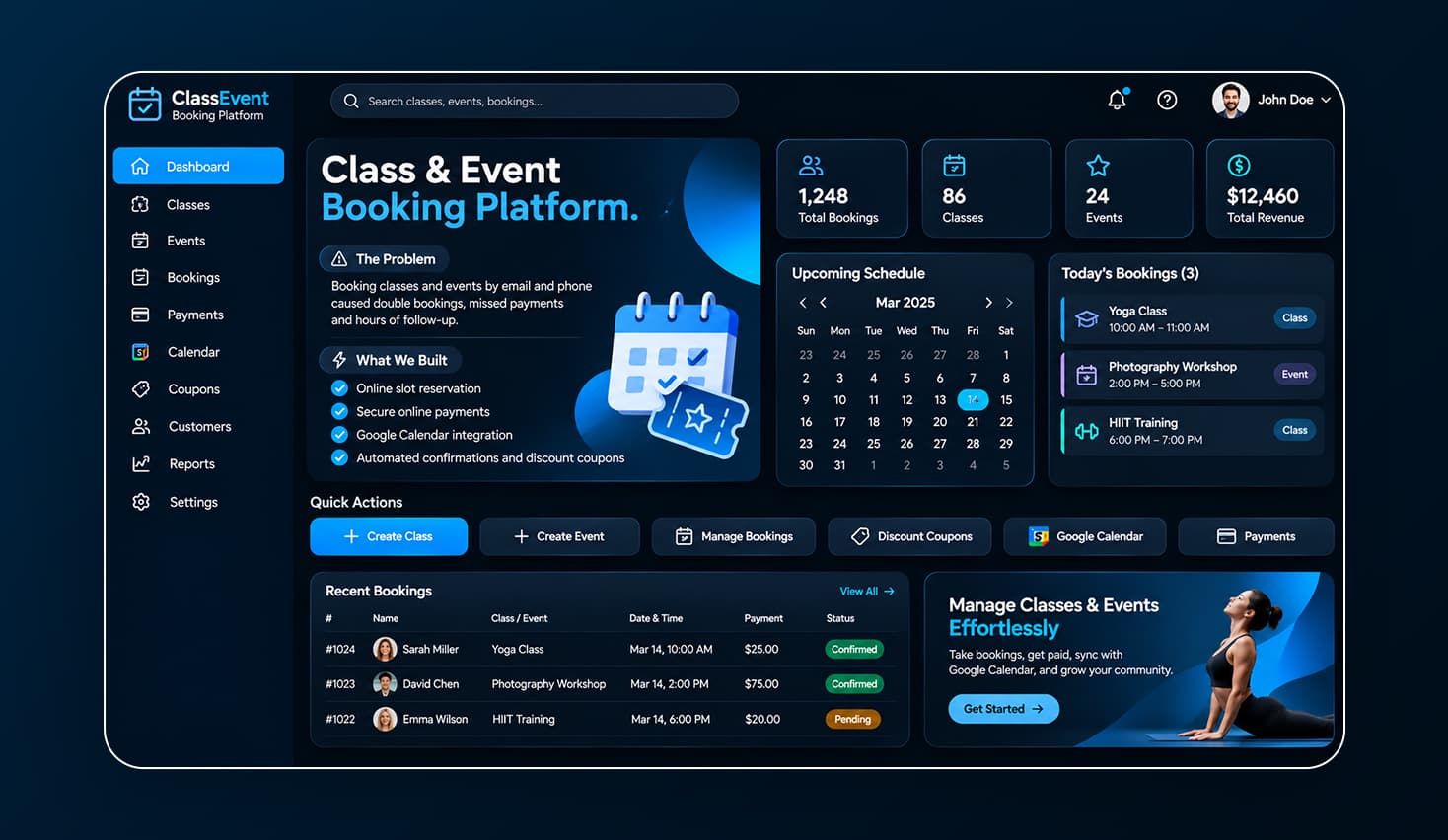
Class & Event Booking Platform
Mobile-friendly online booking with payments, Google Calendar sync and automated reminders so customers can reserve and pay in seconds from any phone.

Boat Rental Marketplace
Map-based search, instant booking, secure payments and digital waivers that work reliably on any device—even near marinas with patchy mobile signal.
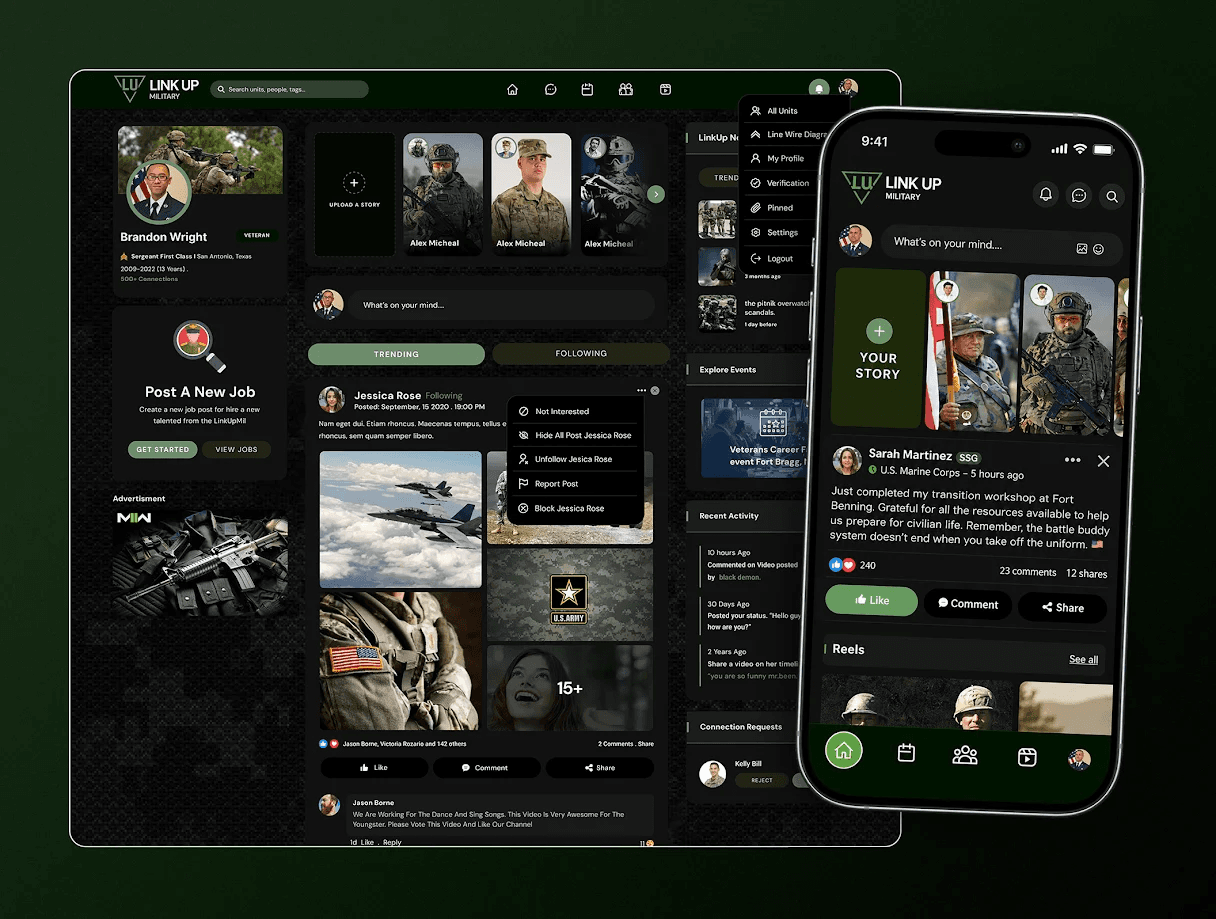
LinkUp Community Platform
A fast community web platform paired with companion iOS and Android apps for real-time messaging, groups and shared updates.
Our PWADevelopment Process
A clear, milestone-driven workflow from discovery and offline strategy to Lighthouse testing and launch.
Discovery
We analyze your users, devices, connection conditions and must-have features.
You get: a PWA vs native recommendation and project brief.
Plan
We map features, offline caching strategy, push notification plan and tech stack.
You get: a scope, timeline and milestone-based estimate.
Design
Mobile-first UI design and seamless home-screen install flows tailored for iOS and Android.
You get: a clickable prototype.
Build
Development in sprints with service workers, smart caching and API integrations.
You get: working features on a staging link you can install.
Test & Launch
Testing on real iPhone, Android and desktop browsers, plus Google Lighthouse performance audits.
You get: a live, installable PWA.
Support
Continuous monitoring, browser compatibility updates and new feature releases.
You get: reliable post-launch maintenance.
Technologies We Usefor PWAs
Modern web standards and battle-tested tooling for speed, offline resilience and search visibility.
How Much DoesPWA Development Cost?
A PWA usually costs less than building separate iOS and Android apps, because one codebase serves every device.
Website to PWA Conversion
Adding installability, offline caching and push notification features to an existing site. Usually the fastest and most affordable option.
Fastest turnaround · Enhances current site
New PWA (MVP)
Core features, secure login, online payments and offline support built from scratch. A first version can be ready in a matter of weeks.
Ready in weeks · Single codebase
Advanced PWA
Multiple user roles, complex offline background sync and deep third-party integrations. Delivered in structured milestones over a few months.
Phased delivery · Offline-first sync
Also exploring native?
Why Choose Esclatech forPWA Development
Honest Platform Advice
We build web, mobile and SaaS, so we recommend a PWA only when it's truly the best fit for your product.
Performance Focus
Every PWA is rigorously tested against Google Lighthouse and Core Web Vitals for sub-second repeat loads.
Real-Device Testing
Tested hands-on across actual iPhones, Android phones and desktop browsers—never just emulators.
Clear Milestones & Costs
Agreed deliverables and transparent pricing for every stage of the project. No surprises.
Room to Grow
Need native iOS or Android apps later? Our mobile team can build them seamlessly on the same back end.
Ready to Give Your Customers an App Without the App Store?
Tell us about your users and what they need to do on their phones. We'll tell you honestly whether a PWA or a native app is the better fit, and what it would take.
What Our Clients Say
Proven Through Real Projects.
Real feedback from businesses and founders we've built software for.


“”
“”
“”
“”
ProgressiveWebAppFAQs
01.What is the difference between a PWA and a native app?
A PWA is built with web technology and runs in the browser, but can be installed and used like an app. A native app is built separately for iOS and Android and installed from the app stores. PWAs cost less and update instantly; native apps have full access to phone hardware.